Picture the old networking ritual: a conversation ends, someone searches a pocket, a paper card appears, and the real work begins later. The recipient still has to type the details into their phone, guess whether the email address has an underscore or a hyphen, and hope the card does not disappear into a laptop bag forever.
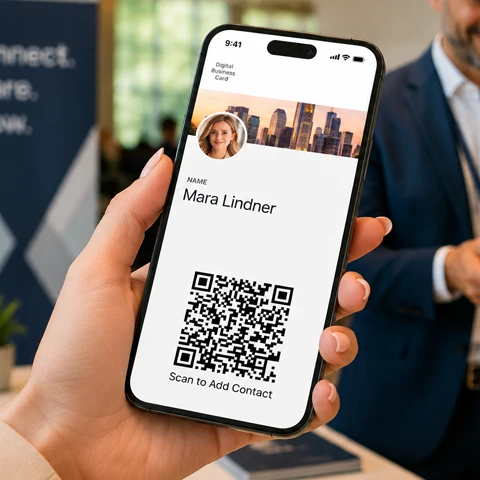
Digital business cards replace that little paper-based obstacle course with something people already know how to use: a smartphone. With Yohn.io, your business card can live directly in Apple Wallet or Google Wallet and be shared with a QR code. No paper stack. No app installation. No manual typing.
A Business Card That Lives Where People Already Look
A digital business card is not just a web page with your name on it. The most useful version is closer to a boarding pass or event ticket: it sits in the wallet app that is already built into most modern phones.
That matters. People are used to opening Apple Wallet and Google Wallet quickly. They use them for flights, events, loyalty cards, and payments. A business card stored there feels natural because it is in a familiar place, ready at the exact moment a conversation turns into an exchange of details.
It also avoids a common problem with many networking tools: app friction. If the other person has to download a special app before they can receive your contact information, the moment often gets lost. Wallet-based digital business cards keep the exchange simple. You open the card, show the QR code, and the recipient scans it with their phone camera.
For companies, there is another quiet advantage. Apple Wallet and Google Wallet are part of the standard mobile ecosystem, so wallet cards are often allowed on managed corporate phones where third-party networking apps may be restricted or blocked. That makes them useful not only for freelancers and founders, but also for sales teams, consultants, event staff, recruiters, and enterprise employees.
Want to see what a wallet-based digital business card looks like? Create one in minutes with our free digital business card generator.
The Two Ways a Digital Business Card Can Work
Most digital business card conversations come down to one important choice: should the QR code open an online profile, or should it store the contact data directly inside the code?
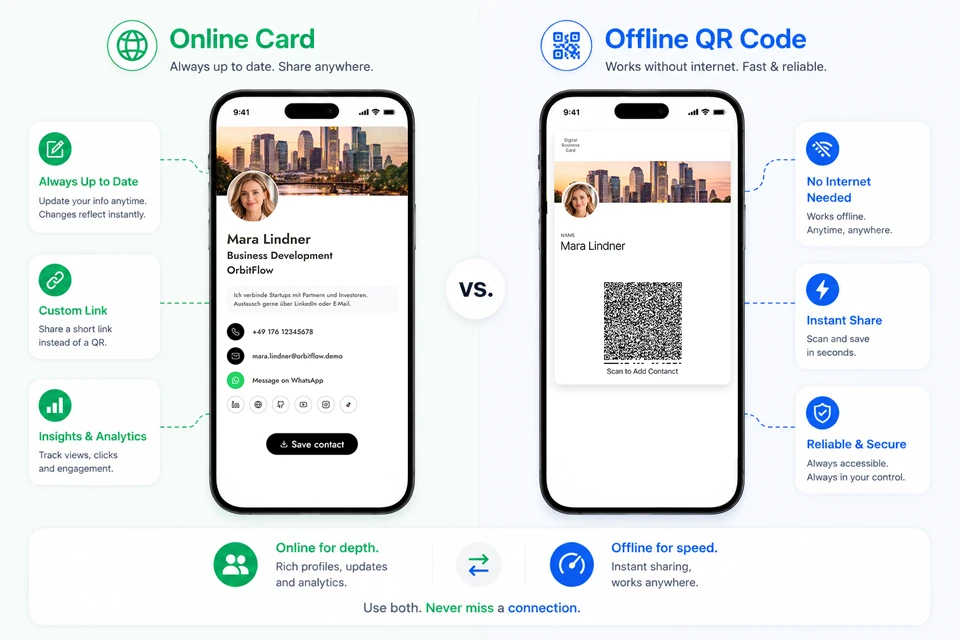
The answer is not always either-or. Many professionals benefit from both. Online cards are richer and easier to update. Offline QR codes are extremely fast and reliable. Understanding the difference helps you choose the right tool for the right moment.
How Sharing Works in Real Life
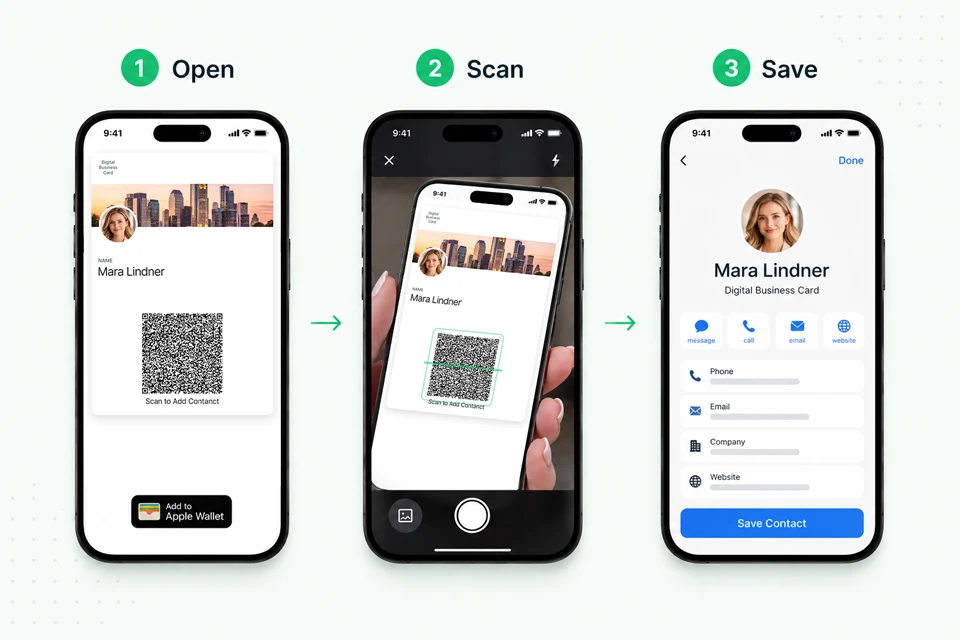
The basic flow is intentionally boring, in the best possible way.
- You open your digital business card in Apple Wallet or Google Wallet.
- The recipient scans the QR code.
- Your details open on their phone.
- They save your contact, visit your links, or message you.
That is the whole point: the technology should disappear into the interaction. At a trade show booth, between sessions at a conference, after a client meeting, or during a quick coffee introduction, the card is already in your pocket because your phone is already in your pocket.
If you are collecting contact details from paper cards too, a business card scanner can help turn those offline introductions into saved contacts without manual typing.
And unlike paper cards, wallet cards can stay current. If your company updates a job title, phone number, website, logo, or campaign link, the card can be updated in the background. Employees do not need to reinstall anything or wait for a new printed batch.
Option 1: The Online Card
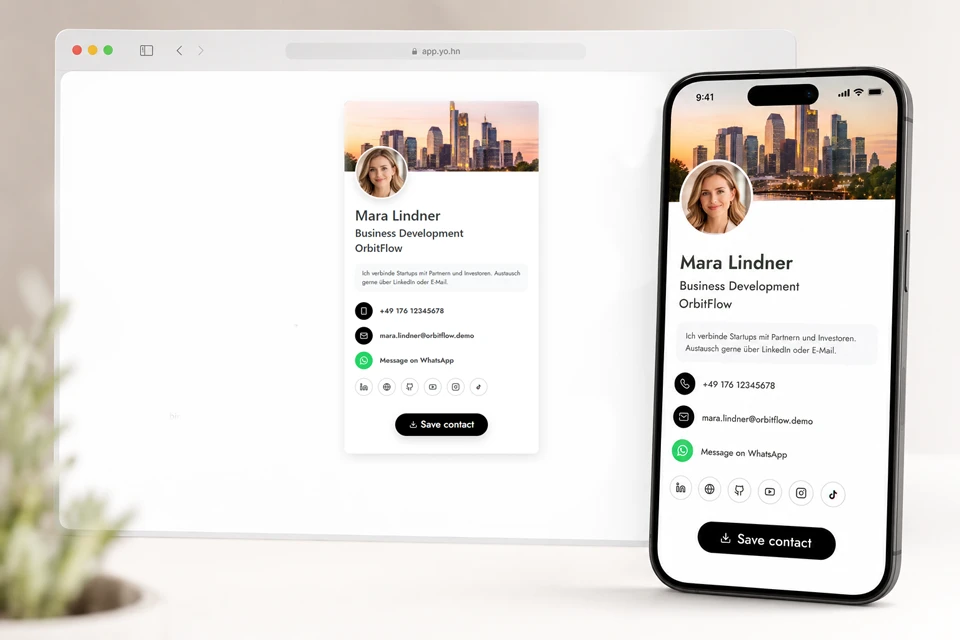
An online digital business card uses a QR code that opens your profile page in the recipient’s browser. Instead of only transferring basic contact fields, the card can become a small interactive hub.
It can include your phone number, email, company website, LinkedIn profile, WhatsApp link, booking page, portfolio, location, lead form, or any other link that makes sense for your work. The recipient scans once and gets a polished, branded page with several possible next steps.
This is the version to use when you want the exchange to do more than create a phone contact. A real estate agent may want to link to active listings. A consultant may want to include a booking calendar. A recruiter may want to link to open roles. A sales team may want to route people to a product page, brochure, or demo request form.
The online card also supports a more dynamic relationship with your information. If your title changes, your company rebrands, or your team updates its messaging before a major event, the destination page can change without changing the QR code itself. That is the same principle behind dynamic QR codes: the code stays usable while the destination can evolve.
Why Online Cards Are Powerful
Online cards are best when the card should feel alive.
They can be updated at any time. They can carry rich branding. They can support buttons, social links, messaging links, analytics, and dynamic content. They are especially useful for teams because one central update can keep every employee’s card aligned with the latest company details.
They also help marketing and sales teams understand what happens after the scan. A paper card cannot tell you whether someone visited your website later. An online card can support scan analytics and link engagement, which makes it more useful for events, campaigns, and follow-up workflows.
Create your own online digital business card with a profile page, social links, WhatsApp button, and QR code using our free digital business card generator.
The trade-off is simple: online cards need an internet connection. Most of the time that is fine. But anyone who has tried to use conference Wi-Fi in a packed hall knows that “most of the time” is not the same as “always.”
Option 2: The Offline QR Code Card
An offline QR code works differently. Instead of sending the recipient to a web page, it stores the contact details directly inside the QR code itself.
When someone scans it, their phone can open the contact app with your details already filled in. They can save the contact with a tap. Because the data is embedded in the code, the process can work without an internet connection.
This is the same idea behind a vCard QR code: the contact details live directly in the QR code instead of depending on a web page to load.
That makes offline QR codes excellent for fast, high-volume, or unreliable environments. Think exhibition halls, basements, international roaming, crowded venues, airports, or any situation where loading a website might slow things down.
The offline card is not trying to be a miniature website. It is trying to win the speed contest. Scan, save, done.
Why Offline QR Codes Are Still Essential
Offline QR codes are valuable because networking often happens in imperfect conditions. The room is loud. The signal is weak. The conversation is short. The person scanning your card may be rushing to the next meeting.
In those moments, reliability beats elegance. A QR code that opens the contact app immediately can be the difference between a saved contact and a forgotten introduction.
Offline QR codes also avoid third-party app requirements. The recipient does not need Yohn.io, Apple Wallet, Google Wallet, or any special networking app to receive the contact details. They only need a phone camera and a contact app.
The limitation is that offline QR codes have less room for rich content. They are not ideal for analytics, profile photos, long lists of links, or frequently changing information. The more data you pack into a QR code, the more complex it becomes, and complex QR codes can be harder to scan.
Need a QR code that works even without internet? Generate a free vCard QR code or create a wallet-based digital business card.
Online vs. Offline: Two Different Superpowers
Online and offline digital business cards solve different problems. The online card is your flexible, branded, updateable networking hub. The offline QR code is your instant contact-saving engine.
| Feature | Online Card | Offline QR Code |
|---|---|---|
| Opens | Browser profile page | Contact app |
| Internet required | Yes | No |
| Best for | Rich profiles, links, analytics, updates | Fast saving, poor signal, high-volume events |
| Can be updated centrally | Yes | Limited |
| Supports interactive buttons | Yes | No |
| Supports analytics | Yes | No |
The smartest setup is often to use both. Keep the online card for a richer first impression and deeper follow-up. Keep the offline QR code for speed and maximum reliability. Together, they cover the real world instead of pretending every networking moment happens under perfect conditions.
Why Wallet Cards Work Especially Well for Teams
For an individual, a wallet-based digital business card is convenient. For a team, it becomes operationally useful.
Companies using digital business cards for companies can keep branding consistent across employees. They can update job titles, departments, phone numbers, office addresses, logos, legal links, and campaign URLs without asking every person to rebuild their card. New employees can receive cards quickly. Existing employees can keep using the same wallet card as their details evolve.
This is particularly useful for organizations that send people into the field: sales teams, real estate agencies, consulting firms, event teams, recruiting teams, healthcare representatives, and franchise networks. Everyone can carry a professional card that looks on-brand and stays current.
It also reduces waste. Instead of throwing away boxes of outdated paper cards after every rebrand or role change, the company updates the digital version.
Frequently Asked Questions
Do digital business cards work without internet?
Yes. Offline QR code cards can store contact details directly inside the QR code, so the recipient can save the contact without opening a website.
Do digital business cards require an app?
No. With wallet-based digital business cards, the card can be stored in Apple Wallet or Google Wallet. Recipients can scan the QR code with their normal smartphone camera.
Are digital business cards better than paper business cards?
Digital business cards are easier to update, harder to lose, and can include links, buttons, analytics, and wallet integration. Paper cards can still be useful, but they cannot be changed after printing.
Can companies manage digital business cards for employees?
Yes. Companies can manage branding, employee details, links, and card updates centrally, which is especially useful for sales teams, recruiters, consultants, and event teams.
The Future of the Business Card Is Not Just Digital. It Is Ready.
The best business card is the one you actually have when the conversation happens. That is why wallet-based digital business cards are so practical: they live in a place people already open, on a device they already carry, using a sharing method they already understand.
Online cards give you depth: links, branding, updates, analytics, and richer context. Offline QR codes give you certainty: fast contact saving even when the internet disappears. Stored in Apple Wallet or Google Wallet, both options become easy to access when the moment is right.
Paper cards made sense when contact sharing had to be physical. Today, your business card can be lighter, smarter, more flexible, and much harder to lose.
Ready to create your own digital business card? Generate a free card, add it to Apple Wallet or Google Wallet, and share it online or offline with a QR code.